Everything your household runs online, watched from one place
Clearview for Private Clients brings the household’s people, homes, devices and payments onto one page. STG watches it every day, handles what it finds, and tells you only what needs you. It is the platform behind our Private Client Security service.
Watched on a schedule, not when someone remembers
Daily
the household's companies, home addresses on the public register, and leaked passwords
Weekly
every adult's name on Google and on nine people-search sites
Each term
how each child's phones and accounts are set up
Monthly
a written briefing, private and confidential
One page shows what needs you and what we handle
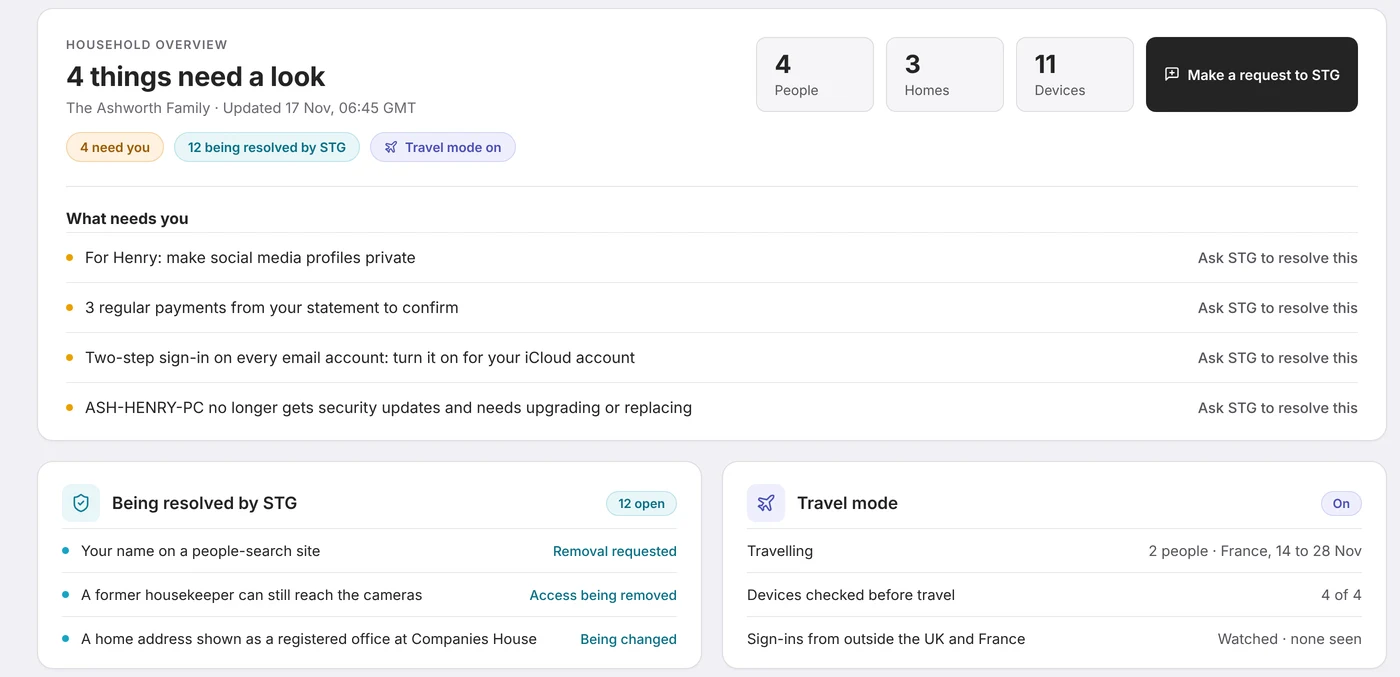
The first thing you see is a count of what needs a look. Under it, only the things you have to do yourself, in plain English, each with a button to hand it to STG instead. Everything else is already with us, and you can see it, so nothing happens behind your back.
- Needs you: the short list only you can act on
- Being resolved by STG: what we have already picked up
- All good: everything that was checked and is fine
Seven areas, on one page
Your name online
Google results for each adult and people-search listings, removed by STG.
Homes and devices
Home networks, cameras, installers' remote access, computers and phones kept up to date.
Money and payments
Trusted payees, your email domain protected, and regular payments you can confirm.
Travel
Homes marked empty, devices checked before you go, sign-ins abroad watched.
Household staff
Who can get into what, and every access removed when someone leaves.
Children
Once a term, how their phones and accounts are set up. Never what they do.
Digital legacy
Which accounts exist and who should be able to get into them if something happens.
Your name, your payments and what comes after
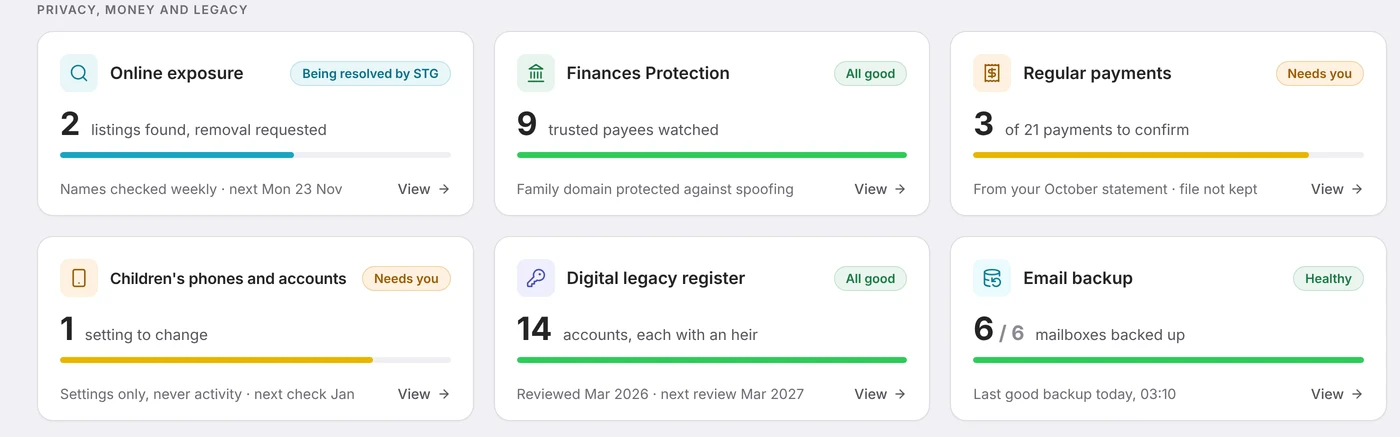
Each week we search for every adult’s name on Google and on nine people-search sites, send the removal requests and check they hold. Trusted payees are watched for lookalike domains, so a fake invoice or a change of bank details in their name is caught. Upload a statement and we find the payments that repeat; you confirm each one, and the statement itself is not kept.
- Online exposure: listings found, removal requested, kept down
- Finances Protection: trusted payees and your email domain
- Digital legacy register: which accounts exist and who inherits access
A card for each person and each home
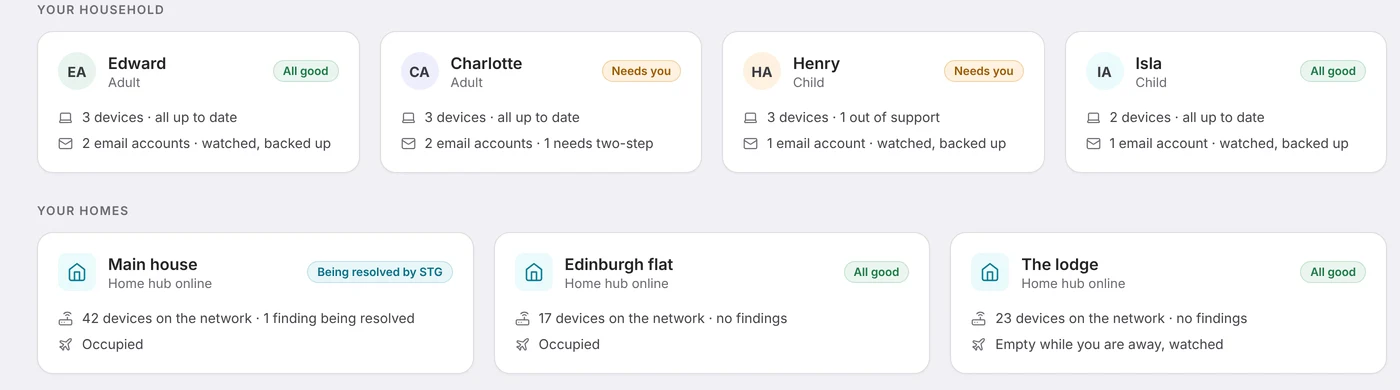
Every member of the household has a card: their devices and whether each is up to date, their email accounts and how each is watched and backed up, and any open requests. Every home has one too: whether its home hub is online, what the network check found, and whether it is marked empty while you travel.
- Cameras and recorders that play without a password
- Router openings and installers’ remote access left switched on
- Sign-ins from the wrong country while you are away
What each part does
Online exposure
Google results for each adult’s name, and listings on people-search sites such as 192.com that rebuild a profile from the open electoral register, Companies House and the phone book. STG sends each removal request, so you do not fill in a single form, then checks every week that the listing has gone and tells you if it comes back.
The household watch
Every day we check the household’s companies at Companies House for changes, look for home addresses used as a registered office or a director’s address, and test each email address against data breaches and passwords stolen by malware. Alerts come to STG first.
Home networks
A home hub in each house watches the network: cameras without a password, router openings, installers’ remote access, old firmware, and smart televisions and speakers sharing the family network.
Email backup
Every mailbox is listed with how it is backed up and when the last good backup ran, so a lost or hijacked account can be recovered. A failing backup becomes an item on the Household Overview.
Finances Protection
The solicitors, schools, advisers and agents you pay are watched for lookalike domains and leaked mailboxes. Email pretending to come from your own domain is rejected. Regular payments are read from a statement you upload, and the statement is discarded.
Travel mode
Mark who is travelling, where to, and which homes will be empty. Devices are checked before you go, GOV.UK travel advice is shown for each country, and Microsoft 365 sign-ins from anywhere else are watched.
Household staff
A list of who can get into the Wi-Fi, mailboxes, calendars and cameras. When someone leaves, a request opens for each access they held, with a daily reminder to us until every one is removed.
Children’s phones and accounts
Once a term we check how each child’s devices and accounts are set up: parental controls, private profiles, location shared with family only, two-step sign-in and purchase approval. Settings only, never activity.
The digital legacy register
Accounts, domains and devices, whose each is, who should inherit access and where the access details are kept. Apple Legacy Contact and Google Inactive Account Manager are recorded for each adult. It is reviewed every year and passwords are never stored in it.
The monthly briefing
A short written briefing each month: what needs you, what STG is resolving, what we did and when each check is next due. It sits on your Briefings page and is never emailed automatically.
Worded for a household, not a company
Private clients see their own version of Clearview. These are the pages.
Household Overview
What needs you, what STG is resolving, and a card for each person and each home.
Online Safety Hub
Your email domains, lookalike domains and what can be seen of you from outside.
Devices Hub
Every computer and phone we look after, whether it is up to date, and the household’s other assets.
Productivity Hub
Microsoft 365, Google Workspace and Proton Mail: the accounts on each and how they are protected.
Digital Hub
The household’s domains and certificates, and its website if it has one.
Requests
Anything you have asked STG to do, and anything we have opened for you, with its progress.
Briefings
Every monthly briefing, kept so you can look back.
Stated plainly, because they are facts about the platform
We never search for your children
Their names are not sent to any search engine or service.
We never read messages or browsing
Children's checks look at settings. Mailboxes are backed up, not read.
We never keep your statements
Only the payments that repeat are kept. The file is discarded.
We never store passwords in the register
It records where access details are kept, not the details.
We never hold more access than we need
We ask for the minimum, write it down and remove it when finished.
Asked before anyone signs anything
What is Clearview for Private Clients?
It is Clearview, the platform STG builds and runs, set up for a household rather than a company. One page shows what needs you and what STG is already resolving, across seven areas: your name online, homes and devices, money and payments, travel, household staff, children and digital legacy.
Who can see our household’s information?
The people in the household you choose, and the STG staff working on your account. Alerts come to STG first. We never discuss one client with another, and the data is held in the UK.
Do you search for our children online?
No. Children are never searched and their names are not sent to any search engine or service. The checks we do for children look at how their phones and accounts are set up, once a term, and never at what they do.
Does anything need to be installed?
A small home hub in each house watches that home’s network, and the computers we look after run a lightweight agent so we can see they are up to date. Everything else is checked from outside.
Can our office manager or an adviser have access?
Yes, if the principal wants it. Access is given by name, recorded, and removed when it is no longer needed.
How do we get it?
Clearview for Private Clients is part of Private Client Security. It starts with a confidential conversation, and what is included is agreed with you from there.
More for private clients and family offices
Guides you can use today
A confidential conversation is the first step
Tell us a little about the household. A senior member of the team responds directly, and non-disclosure agreements are welcome and normal.
Arrange a confidential conversation